Monday, June 06, 2011

Check out Whats happening on the Report Server

Sometime it may happen that Report server may work slow and you  might want to know whats really happening in the server and which reports are in use to get a lead.


1. To know which reports are running on you system is to check ExecutionLog table in ReportServer database of your server.

SELECT * FROM ReportServer.dbo.ExecutionLog

This table contains the history of which report is executed at which time, taking how much time and by whom. This can lead to the report which is taking most time.

But the draw back of this table is that it does not get information about subscription reports. And when I look into any Report Server first thing I look for is Reports Subscriptions. Those are little hidden ones and take work in background with letting anyone who that how much resource and time they are consuming.

2. Next method of knowing whats happening in our Report Server is through Manage Jobs page on ReportServers SiteSettings


This displays and lets user to cancel any In-Progress Report or Subscription. Only limition is that it will display only in-progress reports/subscription which are in-progress for atleast 60 seconds.


Tuesday, May 10, 2011

Data-dump in Dynamic Flat file with todays date

This is with reference to a question asked my an online friend regarding how can we do a daily Datadump on a flat file with a todays date as a file name.

To show that I will use an example in which we will dump a table "Student" from SQL Server database into a file with name appended with todays date and time eg. DataDump_201105101108.txt. 20110510 being the date and 11:08 as time of load.

1. Lets have a look at our table.

2. Now create a simple package with a Data Flow task which dumps data from Student to a flat file let say with Dummy.txt. SSIS is metadata oriented so at the time of creation of package you would need to have a dummy txt file so that mappings can be created.


3. Not the actual work starts. Go the Flat file Connection Managers Properties and expand Expressions.
 Choose ConnectionString as Property.


4. In Expression Builder window create a expression as
"E:\\DataDump_" + (DT_WSTR,4)DatePart("yyyy", GetDate()) + RIGHT("0" + (DT_WSTR,2)DatePart("mm", GetDate()), 2) + RIGHT("0" + (DT_WSTR,2)DatePart("dd", GetDate()), 2) + RIGHT("0" + (DT_WSTR,2)DatePart("hh", GetDate()), 2) + RIGHT("0" + (DT_WSTR,2)DatePart("mi", GetDate()), 2) + ".txt"


5. Run the package it will create a flat file with required File name.


--Cheers

Thursday, April 14, 2011

Can't Expand MSDB in Integration Services Server


TCP Provider: No connection could be made because the target machine actively refused it. (MsDtsSrvr)
OR
"Named Pipes Provider: Could not open a connection to SQL Server [2].  (Microsoft SQL Native Client)"


Other day one of the team here had to work on a fairly static server which has few SSIS packages installed on it. The Team wasn't able to expand MSDB node to view packages installed on the Intergration Services.
Error they were receiving was:


Steps to check if you are not able to expand MSDB in Integration Services:
1. User has permission on MSDB database as SSIS pacakges are stored in MSDB

2. Check if SQLBrowser services is running. Run > Services.msc

3. Check if TCP-IP/Named pipe are enabled for the Sever instance from SQL Server Configuration Manager

4. Windows firewall is not blocking SQL Sever access. Add SQLServer.exe or port 1433 to exceptions.

5. Find MsDtsSrvr.ini file at drive:\Program Files\Microsoft SQL Server\90\DTS\Binn (for 2008 find in 100\DTS\bin folder) and check for Server tag if it is <ServerName>.ServerName> (this was the case with the team here :-) )

If yes then replace "." with Servername\instance name and restart Integration Sevices.

Have fun!!


Tuesday, March 22, 2011

Select ALL in parameter of SSRS report

Select ALL as parameter value is one of the most common functionality which most of the reports have and there are number of ways to implement it.

I will explain below the way I do it and I find easiest. The driver of the solution is CASE option under WHERE clause of SELECT DataSet Query.

        SELECT * FROM TableName
         WHERE
         (
               CASE
                      WHEN  @RepParam <> 'ALL' AND ColName= @
RepParam THEN 1
                      WHEN  @
RepParam= 'ALL'  THEN 1
               END
         ) = 1 ;


Lets see it through an simple Student Table example where we will Select student either on the basis of the Grade they are in or select all of them.

1. Records in Student table are

2. Create a simple report with DataSet Student as SELECT * FROM Student;

3. To add the Grade parameter and option for Select ALL

3.a. Create a DataSet for available Grades for Report parameter

3.b. Configure a Report parameter "Grade" as


3.c. Modify query for Student Dataset  to allow filtering on Grades as

4.a. Run the Report for ALL grades

4.b. Run the Report for grade - X


Cheers!!

Friday, December 10, 2010

Execute Scripts from a folder using Powershell

For last few days I am kinda got wired up with Powershell and trying to do whatever I used to do otherwise using SQL PowerShell e.g. other day we had some 40 odd scripts to be deployed on our database so I worte a simple 2 liner SQL PS script which would go and execute each script one by one.

1. To illustrate I have 3 Scripts in a folder called ScritpsFolder to create 3 Stored Procedures
2. Script inside sp_A


3. Now the Powershell code to execute scripts from the folder.

ForEach ($S In Gci -Path "C:\ScriptsFolder\" -Fliter *.sql | Sort-Object Name )
{
Invoke-SqlCmd -InputFile $S.FullName
}


a) ForEach : will iterate on each item insire $S.
b) Gci (Get-Child Item): will get all the filenames from given path and will store in variable $S.
c) Invoke-SqlCmd: will take the script and run it on the Database.


To run the script you should be in context of your SQL Server/Database and particular database if it not defined in the script.

4. Check the SPs created in the database

Wednesday, December 01, 2010

Execution Tree in SSIS

I have been asked many times, the way we can see Execution Query Plan for Queries in SSMS, Can we see something similar in  SSIS too. Well YES WE CAN, it wont give you factors like I/O, CPU or SubTree Cost but will give you fair idea of path and buffers SSIS engine will create to do the DATA FLOW.

At run time Data Flow Engine divides the Data Flow Task operations into Execution Trees which demonstrate how package uses buffers and threads. These execution trees specify how buffers and threads are allocated in the package.

Each tree creates a new buffer and may execute on a different thread. When a new buffer is created such as when a partially blocking or blocking transformation is added to the pipeline, additional memory is required to handle the data transformation; however, it is important to note that each new tree may also give you additional worker thread.[TechNet]

Let's take an example to show the Execution Tree in the Data Flow Task. I will create a simple Data Flow Task and have two flows in it.

1) Direct transfer of data from SrcEmployee table to DestEmployee table.
2) SrcDepartment to DestDepartment by having one Sort Component in between to sort on DepName.


To see Execution Tree log you will have enable build-in logging and to see log entries add Log Event window from View>OtherWindows.

Now when you run package, SSIS will log an entry for User:PipelineExecutionTrees which discribes the Trees/paths SSIS has created to run the Package.


Message:

Begin Path 0 [Tree 1]
   output "OLE DB Source Output" (11); component "SrcEmployee" (1)
   input "OLE DB Destination Input" (29); component "DestEmployee" (16)
End Path 0

Begin Path 1 [Tree 2]
   output "OLE DB Source Output" (124); component "SrcDepartment" (114)
   input "Sort Input" (147); component "SortDepartment" (146)
End Path 1

Begin Path 2 [Tree 3]
   output "Sort Output" (148); component "SortDepartment" (146)
   input "OLE DB Destination Input" (142); component "DestDepartment" (129)
End Path 2


Happy Extraction and Inception!!

Tuesday, November 16, 2010

MERGE Statement in SQL SERVER 2008

SQL SERVER 2008 has introduced MERGE statement which is very helpful in synchronizing two tables.We can perform INSERT, UPDATE, or DELETE operations on target table based on the result of the join with the source table.


Well Syntax for MERGE is very complex so I will use a very simple example where I will create two table SOURCE  and TARGET and then perform insert, update and delete on SOURCE table and then synchronize TARGET table using MERGE Statement.


1. Lets create two tables Source and Target with same schema and data and after updates in Source we will sync it with Target table.


 CREATE TABLE SOURCE
(
ID INTEGER,
Name VARCHAR(50),
);
GO
INSERT INTO SOURCE
( ID, Name)
VALUES
(1, 'Rahul'),
(2, 'Mark'),
(3, 'Jen');

 SELECT *  INTO TARGET FROM SOURCE;


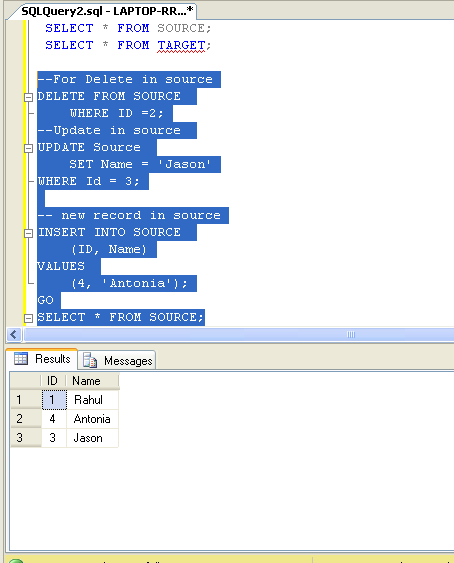
2. Lets modify data in Source table ( Delete , update and Insert new record).

DELETE FROM SOURCE
    WHERE ID =2;
--Update in source
UPDATE Source
    SET Name = 'Jason'
WHERE Id = 3;

-- new record in source
INSERT INTO SOURCE
    (ID, Name)
VALUES
    (4, 'Antonia');


3. Now comes the MERGE Statement
Source table will be joined with Target table on ID and then WHEN clause is used to identify type of changes
a.Update: Where both ID match but other columns doesnt match.
MATCHED and Target.Name <> Source.Name
b. New/Inserts: When IDs are not matched by Target
c. Deletes: When IDs are not matched by Source.


MERGE INTO TARGET
USING (SELECT * from Source) AS SOURCE
ON Target.ID = Source.ID
WHEN -- upadate
    MATCHED and Target.Name <> Source.Name THEN
        UPDATE
        SET Name = SOURCE.Name
WHEN -- new record in source
    NOT MATCHED BY TARGET THEN
        INSERT  ( ID ,Name)
        VALUES ( Source.ID,Source.Name)
WHEN --records deleted in source
    NOT MATCHED BY SOURCE THEN
        DELETE
--see action
OUTPUT $action
    , Inserted.ID AS InsertedID
    , Inserted.NAME AS InsertedName
    , Deleted.ID AS DeletedID
    , Deleted.Name AS DeletedName;


I have used an OUTPUT to see operations performed by MERGE Statement.


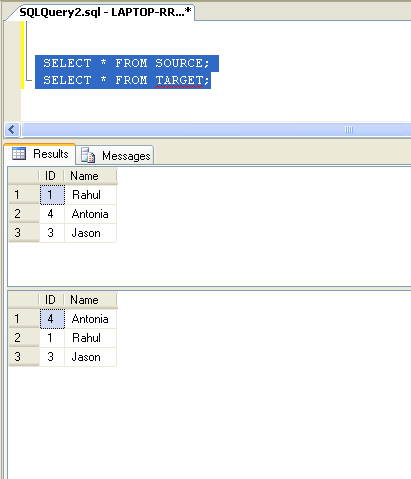
4. Tables after MERGE


Happy Coding!!

Google Dataset Search

Google's Vision statement  is “ to provide access to the world's information in one click. ” Google’s mission Statement is “ ...