Showing posts with label SQL Server 2008. Show all posts

Friday, December 10, 2010

Execute Scripts from a folder using Powershell

For last few days I am kinda got wired up with Powershell and trying to do whatever I used to do otherwise using SQL PowerShell e.g. other day we had some 40 odd scripts to be deployed on our database so I worte a simple 2 liner SQL PS script which would go and execute each script one by one.

1. To illustrate I have 3 Scripts in a folder called ScritpsFolder to create 3 Stored Procedures
2. Script inside sp_A


3. Now the Powershell code to execute scripts from the folder.

ForEach ($S In Gci -Path "C:\ScriptsFolder\" -Fliter *.sql | Sort-Object Name )
{
Invoke-SqlCmd -InputFile $S.FullName
}


a) ForEach : will iterate on each item insire $S.
b) Gci (Get-Child Item): will get all the filenames from given path and will store in variable $S.
c) Invoke-SqlCmd: will take the script and run it on the Database.


To run the script you should be in context of your SQL Server/Database and particular database if it not defined in the script.

4. Check the SPs created in the database

Tuesday, November 16, 2010

MERGE Statement in SQL SERVER 2008

SQL SERVER 2008 has introduced MERGE statement which is very helpful in synchronizing two tables.We can perform INSERT, UPDATE, or DELETE operations on target table based on the result of the join with the source table.


Well Syntax for MERGE is very complex so I will use a very simple example where I will create two table SOURCE  and TARGET and then perform insert, update and delete on SOURCE table and then synchronize TARGET table using MERGE Statement.


1. Lets create two tables Source and Target with same schema and data and after updates in Source we will sync it with Target table.


 CREATE TABLE SOURCE
(
ID INTEGER,
Name VARCHAR(50),
);
GO
INSERT INTO SOURCE
( ID, Name)
VALUES
(1, 'Rahul'),
(2, 'Mark'),
(3, 'Jen');

 SELECT *  INTO TARGET FROM SOURCE;


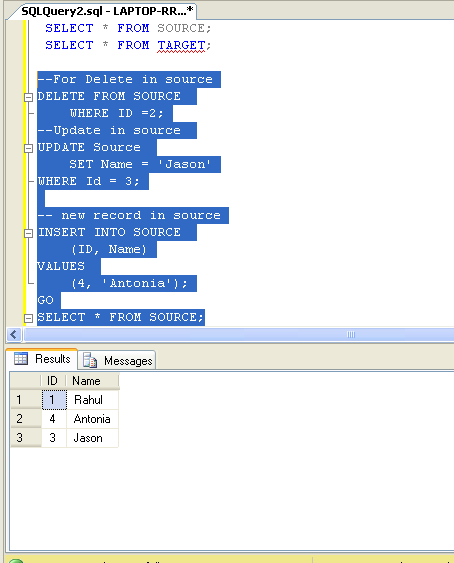
2. Lets modify data in Source table ( Delete , update and Insert new record).

DELETE FROM SOURCE
    WHERE ID =2;
--Update in source
UPDATE Source
    SET Name = 'Jason'
WHERE Id = 3;

-- new record in source
INSERT INTO SOURCE
    (ID, Name)
VALUES
    (4, 'Antonia');


3. Now comes the MERGE Statement
Source table will be joined with Target table on ID and then WHEN clause is used to identify type of changes
a.Update: Where both ID match but other columns doesnt match.
MATCHED and Target.Name <> Source.Name
b. New/Inserts: When IDs are not matched by Target
c. Deletes: When IDs are not matched by Source.


MERGE INTO TARGET
USING (SELECT * from Source) AS SOURCE
ON Target.ID = Source.ID
WHEN -- upadate
    MATCHED and Target.Name <> Source.Name THEN
        UPDATE
        SET Name = SOURCE.Name
WHEN -- new record in source
    NOT MATCHED BY TARGET THEN
        INSERT  ( ID ,Name)
        VALUES ( Source.ID,Source.Name)
WHEN --records deleted in source
    NOT MATCHED BY SOURCE THEN
        DELETE
--see action
OUTPUT $action
    , Inserted.ID AS InsertedID
    , Inserted.NAME AS InsertedName
    , Deleted.ID AS DeletedID
    , Deleted.Name AS DeletedName;


I have used an OUTPUT to see operations performed by MERGE Statement.


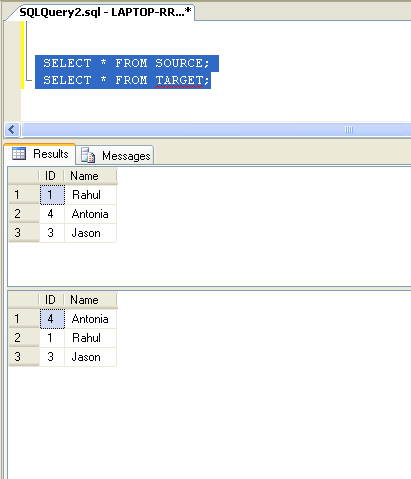
4. Tables after MERGE


Happy Coding!!

Thursday, April 22, 2010

Jobs Running on Server

To find out jobs running on a server through T-Sql

DECLARE @job_owner VARCHAR(100);

SELECT @job_owner = SUSER_SNAME()

IF EXISTS
(
    SELECT 1    FROM tempdb.dbo.sysobjects
    WHERE ID = OBJECT_ID(N'tempdb..#JobStats')
)
BEGIN
    DROP TABLE #JobStats
END


CREATE TABLE
    #JobStats
    (
        job_id UNIQUEIDENTIFIER
    ,    last_run_date INT
    ,    last_run_time INT
    ,    next_run_date INT
    ,    next_run_time INT
    ,    next_run_schedule_id  INT
    ,    requested_to_run INT
    ,    request_source INT
    ,    request_source_id VARCHAR(100)
    ,    running INT
    ,    current_step INT
    ,    current_retry_attempt INT
    ,    job_state INT
    )  


 INSERT INTO #JobStats
            EXECUTE master.dbo.xp_sqlagent_enum_jobs 1, @job_owner
          
SELECT
    sysjobs.name
,    JobStats.current_step
,    JobStats.running
,    JobStats.*
FROM
    #JobStats JobStats
    JOIN MSDB..sysjobs sysjobs
    ON JobStats.job_id = sysjobs.job_id


OR 

SELECT
SYSJOBS.Name
, SYSJOBS.Job_Id
, SYSPROCESSES.HostName
, SYSPROCESSES.LogiName
, *
FROM
MSDB.dbo.SYSJOBS
JOIN
MASTER.dbo.SYSPROCESSES
ON
SUBSTRING(SYSPROCESSES.PROGRAM_NAME,30,34)
=MASTER.dbo.fn_varbintohexstr ( SYSJOBS.job_id)
AND
LEFT(PROGRAM_NAME,28) ='SQLAgent - TSQL JobStep (Job'

Saturday, April 10, 2010

Delete Duplicates from a Table

WITH DupCTE(Col1,Col2, Ranking)
AS
(
SELECT
Col1
, Col2
, DENSE_RANK() OVER
(PARTITION BY ID ORDER BY NEWID() ASC) AS Ranking
FROM TableName
)

DELETE FROM DupCTE
WHERE Ranking > 1;
GO

Few days back I had a table which had duplicates on the Id columns also, so i had to flip a bit to write a shortest code i can write to delete or remove duplicates from the table.
Below I will demonstrate it by create a temp table, inserting it with some duplicate data and then remove the dups using CTE( Common Table Expressions)

1. Create Table with duplicate data:
--Create Table
CREATE TABLE #Dups
(
Id INT
, Name VARCHAR(50)
);
GO
--Insert data with Duplicates
INSERT INTO #Dups VALUES ( 1, 'Rahul');
INSERT INTO #Dups VALUES ( 2, 'Divya');
INSERT INTO #Dups VALUES ( 3, 'Jason');

GO

2. CTE to remove Dups:
WITH DupCTE(Id, Name, Ranking)
AS
(
SELECT
ID
, Name
, DENSE_RANK() OVER(PARTITION BY ID ORDER BY NEWID() ASC) AS Ranking
FROM #Dups
)

DELETE FROM DupCTE
WHERE Ranking > 1;
GO


You can download the complete sample code from here.

Cheers!!

Friday, October 31, 2008

New Datatypes in SQL Server 2008

SQL Server 2008 has introduced 4 new datatype:

  • Date and Time: Four new date and time data types have been added, making working with time much easier than it ever has in the past. They include: DATE, TIME, DATETIME2, and DATETIMEOFFSET.
  • Spatial: Two new spatial data types have been added--GEOMETRY and GEOGRAPHY--which you can use to natively store and manipulate location-based information, such as Global Positioning System (GPS) data.
  • HIERARCHYID: The HIERARCHYID data type is used to enable database applications to model hierarchical tree structures, such as the organization chart of a business.
  • FILESTREAM: FILESTREAM is not a data type as such, but is a variation of the VARBINARY(MAX) data type that allows unstructured data to be stored in the file system instead of inside the SQL Server database.

Date and Time:

In SQL Server 2005 and earlier, SQL Server only offered two date and time data types: DATETIME and SMALLDATETIME. While they were useful in many cases, they had a lot of limitations, including:

  • Both the date value and the time value are part of both of these data types, and you can’t choose to store one or the other. This often causes a lot of wasted storage (because you store data you don’t need or want); adds unwanted complexity to many queries because the data types often had to be converted to a different form to be useful; and often reduces performance because WHERE clauses with these data and time data types often had to include functions to convert them to a more useful form, preventing these queries from using indexes.
  • They are not time-zone aware, which often requires extra coding for time-aware applications.
  • Precision is only .333 seconds, which is often not granular enough for some applications.
  • The range of supported dates is not adequate for some applications, and the range does not match the range of .NET CLR DATETIME data type, which requires additional conversion code.

To overcome these problems, SQL Server 2008 introduces four new date and time data types, which include:

  • DATE: As you can imagine, the DATE data type only stores a date in the format of YYYY-MM-DD. It has a range of 0001-01-01 through 9999-12-32, which should be adequate for most business and scientific applications. The accuracy is 1 day, and it only takes 3 bytes to store the date.
  • TIME: TIME is stored in the format: hh:mm:ss.nnnnnnn, with a range of 00:00:00.0000000 through 23:59:59:9999999 and is accurate to 100 nanoseconds. Storage depends on the precision and scale selected, and runs from 3 to 5 bytes.
  • DATETIME2: DATETIME2 is very similar to the older DATETIME data type, but has a greater range and precision. The format is YYYY-MM-DD hh:mm:ss:nnnnnnnm with a range of 0001-01-01 00:00:00.0000000 through 9999-12-31 23:59:59.9999999, and an accuracy of 100 nanoseconds. Storage depends on the precision and scale selected, and runs from 6 to 8 bytes.
  • DATETIMEOFFSET: DATETIMEOFFSET is similar to DATETIME2, but includes additional information to track the time zone. The format is YYYY-MM-DD hh:mm:ss[.nnnnnnn] [+|-]hh:mm with a range of 0001-01-01 00:00:00.0000000 through 0001-01-01 00:00:00.0000000 through 9999-12-31 23:59:59.9999999 (in UTC), and an accuracy of 100 nanoseconds. Storage depends on the precision and scale selected, and runs from 8 to 10 bytes.

Google Dataset Search

Google's Vision statement  is “ to provide access to the world's information in one click. ” Google’s mission Statement is “ ...